

The short answer
Tech neck is neck and upper back strain from looking down at phones and laptops for long periods. The further your head tips forward, the more load your neck carries; one study estimated about 60 pounds at a 60 degree tilt. Raising your screens, taking regular breaks and strengthening your upper back may help ease it.
- Tech neck is a habit pattern, not a formal diagnosis
- Estimated neck load rises from about 10 to 60 pounds
- Screen height and regular breaks are simple first steps
- Numbness, weakness or fever with neck pain needs a doctor
Look around any coffee shop on a weekday and you will see it: heads tipped down over laptops and phones, shoulders rounded forward. That posture has a nickname, tech neck, and it can leave your neck, shoulders and upper back tight by the end of the day.
Cleveland Clinic notes that straining your neck to view a computer screen for long periods is a common cause of neck pain. The good news is that small changes to your setup and habits may help ease the strain.
This guide explains why looking down loads your neck, which symptoms to watch for, and 7 practical ways to ease tech neck. It also covers when ergonomic training or chiropractic care might help.
What is tech neck?
Tech neck, sometimes called text neck, is a nickname for neck strain linked to looking down at screens for long stretches. It is not a formal diagnosis. It describes a habit: the head drifts forward and down, and the neck and upper back work harder to hold it there.
Over time, many people settle into forward head posture, where the ears sit in front of the shoulders and the shoulders roll inward. Hours of laptop work, evenings scrolling on a phone and long stretches of sitting all add up.
In Los Angeles, a typical day might mean a desk job in a studio or office, a laptop session at a coffee shop, then a long commute that keeps you seated even longer. If you notice ongoing postural issues like rounded shoulders, your screens may be part of the story.
Why looking down strains your neck
Your head is heavy. Cleveland Clinic notes the average human head weighs about 10 pounds, and your neck supports that weight and keeps your head aligned all day.
When your head is balanced over your shoulders, that load is fairly easy to carry. As you tip it forward, the muscles at the back of your neck have to pull harder to keep your head from dropping.
A 2014 study by Kenneth Hansraj in the journal Surgical Technology International estimated how much force the neck sees as the head tilts forward. A 2022 paper in the journal Heliyon summarizes those estimates, shown in the table and diagram below.
| Head angle | Position | Estimated load on the neck |
|---|---|---|
| 0 degrees | Head level, looking straight ahead | About 10 to 12 pounds |
| 15 degrees | Slight downward tilt | About 27 pounds |
| 30 degrees | Moderate downward tilt | About 40 pounds |
| 45 degrees | Deep downward tilt | About 49 pounds |
| 60 degrees | Chin dropped toward the chest | About 60 pounds |
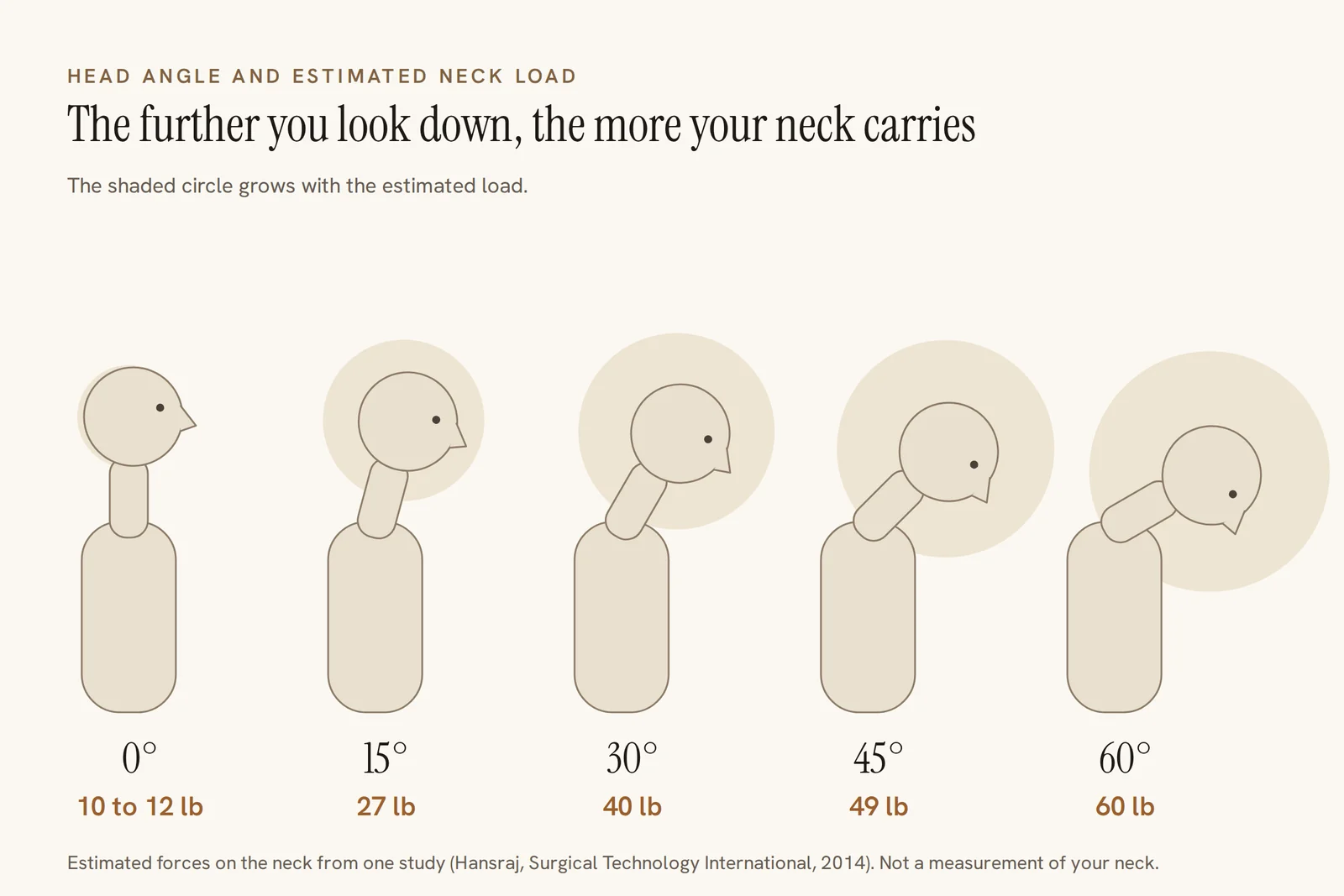
Treat these numbers as estimates from one study, not measurements of your own neck. Still, they show the basic idea: the further your head tips forward, the harder your neck has to work.
Common tech neck symptoms
Tech neck tends to build gradually. Many people notice it most at the end of a workday or after a long stretch on the phone.
- Tightness or aching in the neck and tops of the shoulders
- A stiff neck that makes it harder to turn or tilt your head
- Headaches
- An ache between the shoulder blades or across the upper back
- Rounded shoulders and a head that juts forward in photos
- Sometimes, numbness or tingling in the shoulders or arms
If headaches are a regular part of your week, headache treatment that looks at the neck and upper back may be worth asking about.
Numbness, tingling or weakness deserve more attention, since they can point to an irritated nerve. See the red flags later in this guide.
If neck tightness from screen time is wearing on you, book a consultation with Dr. Okhowat to look at your posture, your setup and your daily habits.
7 ways to ease tech neck
You do not need to give up your phone or laptop. These habits aim to bring your head back over your shoulders more often and give your neck regular breaks.
1. Raise your screen to eye level
Set your monitor so the top of the screen is at or just below eye level, about an arm's length away. Cleveland Clinic recommends positioning computers and phones so you do not have to slouch or strain your neck.
2. Bring your phone up, not your head down
Hold your phone closer to eye level and lower your eyes rather than your whole head. Resting your elbow on a table or on your other arm makes this easier during longer reads.
3. Move every 20 to 30 minutes
Set a timer as a reminder to look up, roll your shoulders and stand for a minute. Cleveland Clinic suggests that people who sit for long periods take breaks to move around and stretch, including the neck.
4. Practice chin tucks
Sit tall and gently glide your chin straight back, as if making a double chin, without tipping your head down. Hold for a few seconds, relax, and repeat 5 to 10 times. Stop if it causes pain.
5. Try a doorway chest stretch
Rounded shoulders often come with tight chest muscles. Place your forearms on either side of a doorway with elbows near shoulder height, then step forward gently until you feel a stretch across your chest. Hold for about 20 to 30 seconds.
6. Strengthen your upper back
Cleveland Clinic notes that as upper back strength fades with age, the shoulders rock forward and the head tips in front of the spine, adding strain to the neck and upper back. It suggests exercises like these, 10 times each:
- Scapular squeezes: pinch your shoulder blades together
- Standing push-ups in a doorframe, letting your shoulders move past your hands
- Band rows: loop a resistance band around a doorknob and pull your hands toward your waist
Corrective exercises chosen for your own posture and strength can take this a step further.
7. Set up your laptop like a desktop
A laptop's screen and keyboard are attached, so one of them is always in the wrong spot. A laptop stand plus a separate keyboard and mouse lets you raise the screen without hunching your shoulders.
Working from a coffee shop table without that gear? Prop the laptop on a few books when you can, and take more frequent breaks.
A desk setup that is easier on your neck
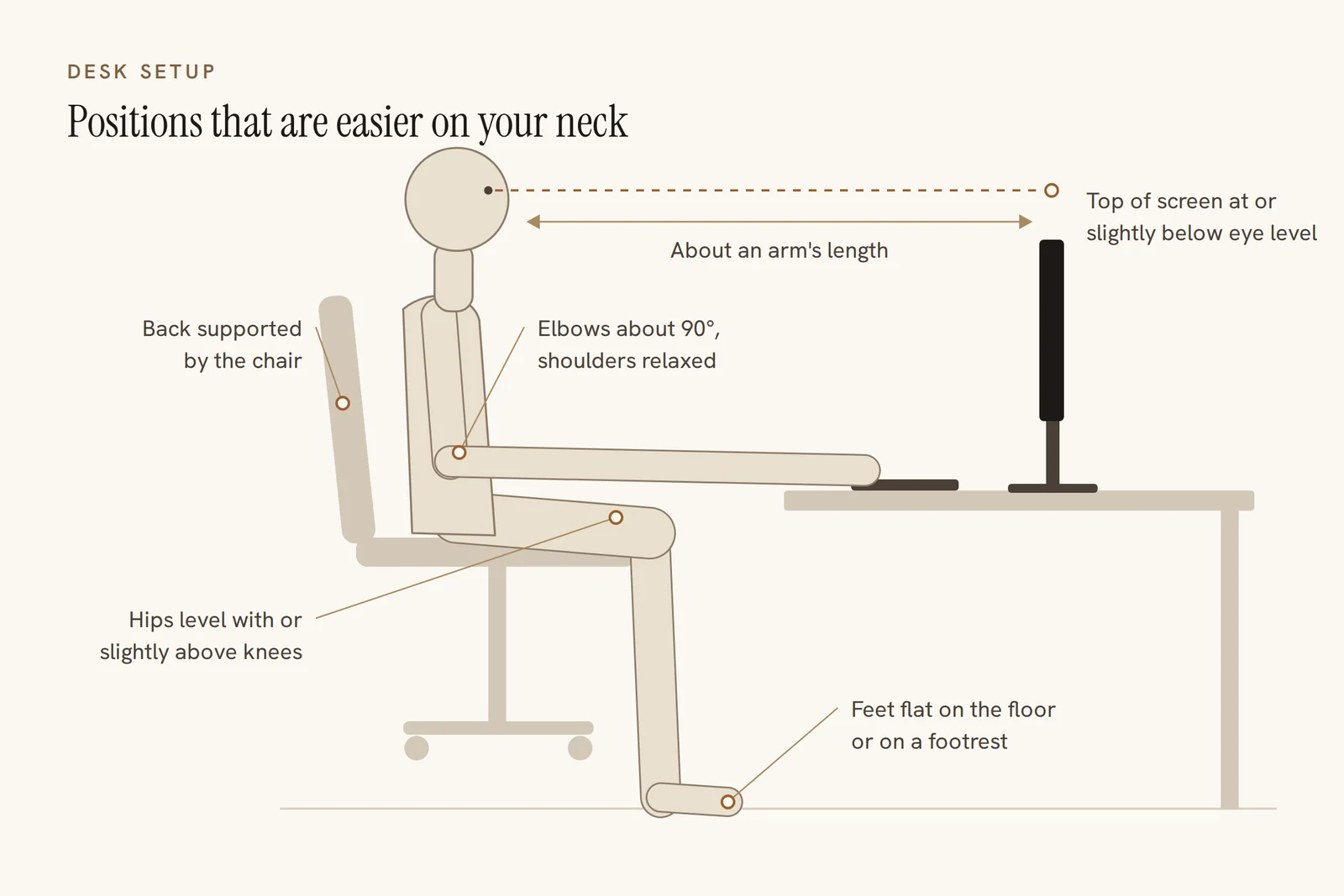
If you sit at a desk for much of the day, a few setup basics can take strain off your neck and shoulders. The diagram below shows the key positions to aim for.
Desk setup checklist
- Top of the monitor at or slightly below eye level
- Screen about an arm's length away
- Elbows bent about 90 degrees and close to your sides
- Shoulders relaxed, not shrugged toward your ears
- Wrists fairly straight while typing
- Hips slightly above your knees
- Feet flat on the floor or on a footrest
- Back supported by the chair
- A stand or holder to raise your phone during calls and video
Your car counts too. Cleveland Clinic suggests adjusting your car seat to maintain good posture while traveling, which matters on a long drive across Los Angeles.
When neck pain needs a doctor
Cleveland Clinic notes that most causes of neck pain are not serious and improve with conservative treatment. Some symptoms, though, call for a physician first.
See a doctor right away if your neck pain
- Started after an accident, fall or other injury
- Comes with loss of bladder or bowel control
- Comes with numbness or tingling in your arms, shoulders or legs
- Comes with weakness in your legs or loss of coordination
- Comes with headache, dizziness, nausea or vomiting
- Comes with fever, chills or unexplained weight loss
- Comes with a sudden, severe headache or signs of stroke such as face drooping or slurred speech (call 911)
- Stays the same whether you move or stay still
- Has not improved after one week
In an emergency, call 911. Otherwise, please see a physician or urgent care before booking chiropractic care.
How chiropractic care and ergonomic coaching may help
Cleveland Clinic lists chiropractic care among the alternative therapies a provider may suggest for neck pain, along with acupuncture and massage. It is one conservative option, often combined with exercise and better habits.
For tech neck, care at Okhowat Chiropractic aims to do two things: ease the tight, sore tissues now, and change the posture and setup that keep loading your neck. Depending on your exam, that may include spinal adjustments, soft tissue work and a home exercise plan.
Ergonomic coaching looks at how you actually sit, stand and use your devices, then suggests specific changes. Small, specific tweaks, like raising a monitor a few inches, can be easier to keep up than a full overhaul.
How Dr. Okhowat helps with tech neck
Dr. Omid Okhowat, DC, has been in practice since 1999 and has over 25 years of experience. He is an AAIM Diplomate of the College of Manipulative and Body Based Practices and a member of the American and California Chiropractic Associations.
Your first visit starts with a conversation about your work, your screens and where you feel the strain. Dr. Okhowat then assesses your posture, movement, joints and muscles, and screens for anything a physician should see first.

From there, you get a personalized plan: what he found, what he recommends, how often, and how you will know it is working. Hands-on care may include adjustments, soft tissue work and corrective exercise.
The longer-term focus is recovery and prevention: strength, posture and daily habits that fit your real workday. If your low back also complains after long days of sitting, these stretches for lower back pain pair well with the neck tips above.
The office is on Wilshire Boulevard just west of Fairfax Avenue, open Monday to Thursday 9 AM to 9 PM and Friday 9 AM to 5 PM. Call (323) 933-3357 or use the contact page to request a visit.
Tired of ending every workday with a stiff neck? Book a consultation with Dr. Okhowat and get a plan built around your desk, your phone and your posture.
Questions readers ask
Can tech neck be reversed?
Many people find their symptoms ease when they raise their screens, take regular breaks and strengthen the upper back. How much posture itself changes varies from person to person. Results depend on keeping the new habits going, so start with one or two changes you can stick with.
How long does it take for tech neck pain to go away?
Cleveland Clinic notes that neck pain from common issues like strains and stress usually improves within a week or two, though it may take a few months to disappear entirely. If your pain has not improved after one week, or comes with numbness or weakness, see a provider.
Is heat or ice better for a stiff neck from screen time?
For muscle tightness without an injury, heat can help loosen muscles and promote blood flow. Cold is the usual choice right after an injury. Use either for about 15 minutes at a time, with a towel between the pack and your skin.
What is the right way to hold a phone to protect your neck?
Raise the phone toward eye level and lower your eyes rather than bending your neck. Prop your elbow on a table or your other arm for longer reads, and use a stand for calls and video.
Can tech neck cause headaches?
Cleveland Clinic lists headache among the symptoms that can come with neck pain. If yours come with neck stiffness after long screen sessions, posture and setup changes may help. A sudden, severe headache needs emergency care.
How many chiropractic visits will I need for tech neck?
It depends on the exam, how long you have had symptoms and how your neck responds. Dr. Okhowat explains how often he recommends visits and how you will know the plan is working, and home habits are a big part of the plan.
Does insurance cover chiropractic care for neck pain?
Coverage depends on your plan. Okhowat Chiropractic accepts insurance, so call (323) 933-3357 to check your plan before your first visit. Have your insurance details handy when you call.
Sources
- NIH National Library of Medicine (PMC): The prevalence of bad posture and musculoskeletal symptoms originating from the use of gadgets (Heliyon, 2022)
- Cleveland Clinic: Neck Pain

About the author
Dr. Okhowat earned his Doctor of Chiropractic degree at Cleveland Chiropractic College and has practiced in Los Angeles since 1999. He is licensed by the California Board of Chiropractic Examiners and is a member of the American Chiropractic Association and the California Chiropractic Association.
- DC, Cleveland Chiropractic College
- AAIM Fellow
- AAIM Diplomate, Manipulative and Body Based Practices
- Over 25 years of experience
This article is general information, not medical advice, and is not a substitute for an exam. Please talk with a qualified provider about your situation. Individual results vary.